01
Hear every note at your pace
Slow a song to 20% or push it to 200% while preserving pitch, so fast runs become clear without sounding out of tune.

Private Beta Program now open
Coming soon!
LickLaboratory turns any recording into a focused practice session. Slow it down without changing pitch, isolate instruments, loop the exact phrase, match the key, and record yourself—all without changing the original song. 100% Local. No monthly subscriptions or cloud access needed!
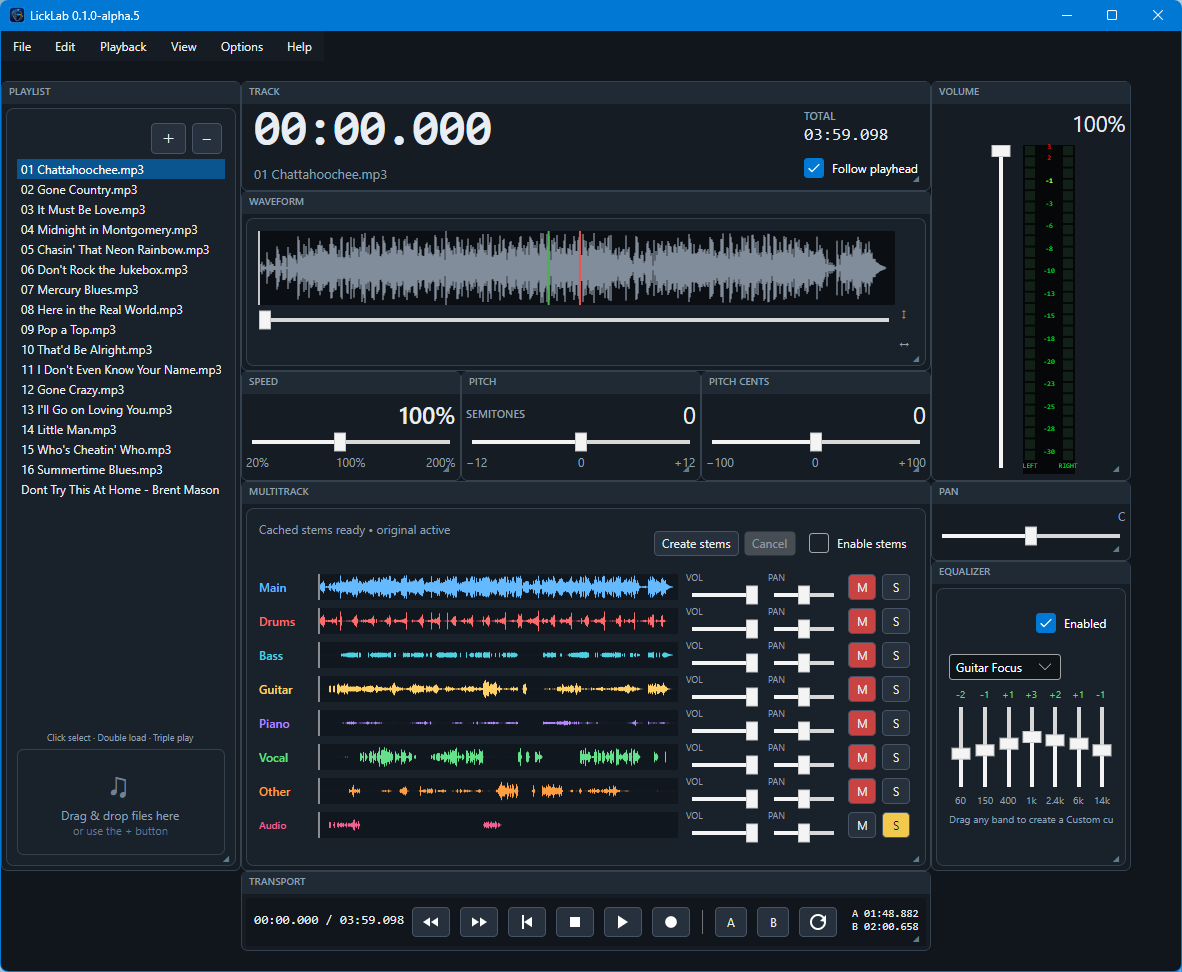
Built for real practice sessions
LickLaboratory brings the listening, repetition, sound-shaping, recording, and organization tools musicians need into one focused application for Windows x64 and M-Series Macs.
Slow a song to 20% or push it to 200% while preserving pitch, so fast runs become clear without sounding out of tune.
Transpose by semitones, then fine-tune by cents to match your instrument, voice, or a recording that is slightly off concert pitch.
Build precise A/B loops and nudge either boundary down to 10 milliseconds until the repetition starts and ends exactly where you need it.
See the waveform, scrub in either direction, zoom in, and follow the playhead instead of guessing where a passage begins.
Separate vocals, drums, bass, guitar, piano, and other parts locally, then mute, solo, pan, and balance the lanes around what you are learning.
Create a new song or capture a synchronized audio lane alongside the track, then listen back against the same speed and pitch context.
Shape playback with seven-band EQ, volume, pan, mute, solo, stereo metering, normalization, and a master level that follows you.
Keep playlists, per-track practice state, saved layouts, preferences, and compact views ready for the next session.
Map keyboard shortcuts or use compatible MIDI, HUI, and MCU hardware for transport control without reaching for the mouse.
Open MP3, WAV, WMA, Ogg Vorbis, FLAC, AAC, and M4A files, then export useful practice loops as WAV, AIFF, or Ogg.
Move and resize cards, save layouts, customize stem colors and EQ defaults, or switch to a compact view when screen space matters.
Playback, recording, stem creation, and application state stay on your computer. LickLaboratory has no cloud audio-processing path or application telemetry.
A clear path from focused playback to deep practice
A focused player for musicians who want the essential listen, loop, slow-down, and transpose workflow.
The complete practice workspace for organizing songs, isolating parts, shaping sound, recording takes, and controlling the session hands-free.
Source audio, recordings, temporary PCM, application state, logs, and generated stems remain on your Windows PC or Mac. LickLaboratory currently includes no application telemetry and no cloud audio-processing path.